
EXAPLAY 3.5 is now live
Screens, outputs and PCs, all in one view. Drag, drop, play.
EXAPLAY 3.5 is our biggest release yet. The changes below are all new since 3.3. We built it for people who run shows every day in planetariums, museums, event halls and permanent installations.
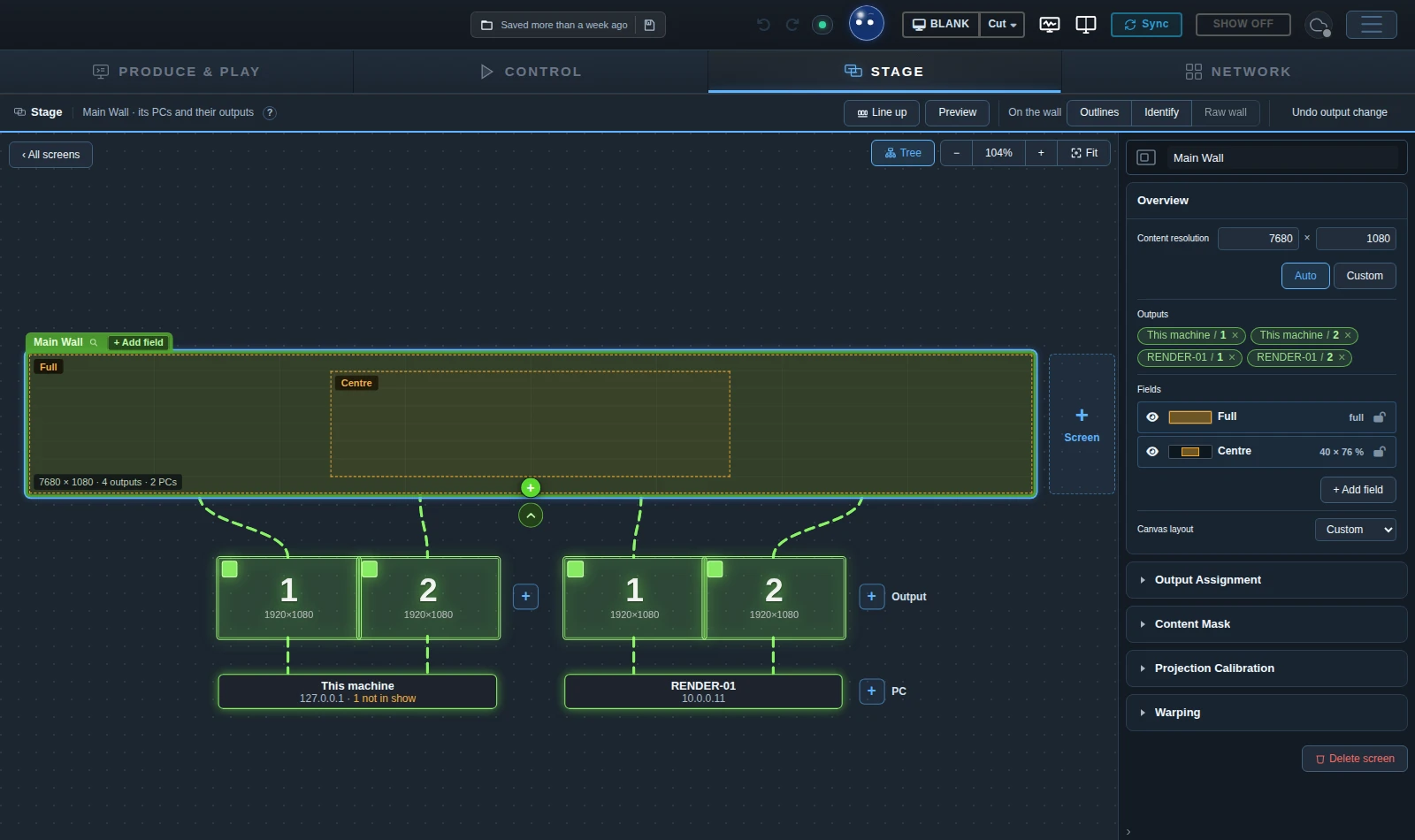
See what’s playing in every room
The rebuilt Stage brings your whole rig into one view in a consistent dark interface. Give the main hall and foyer their own Stage tabs. Drag an output onto a screen to assign it, then drop in a video, live feed or generator to play it. When the hall needs to go dark, blank its entire Stage across all its PCs in one click.
Drop a VIOSO calibration file (.vwf) onto a screen and EXAPLAY assigns channels where the outputs allow it. Multi-PC installations can use one file per machine.
Make the last edit on the timeline
Trim a clip, split it at the playhead or slip the footage inside it without moving the clip. Playlist items can be copied, pasted and duplicated.

97 live GPU generators
97 live GPU generators are ready to drag onto a timeline, a playlist or a screen, just like a video. There is nothing to render in advance, nothing to copy and no file to send around a multi-client rig.
Backgrounds, abstract motion, nature, clocks, countdowns and audio-reactive visuals, plus 23 dome generators, from a night sky and aurora to warp flights and fireworks.
Make the room respond to visitors
In the Inputs tab, link a sensor to a cue so visitors can start the next scene by stepping into a zone. Interactive worlds such as Koi Pond can respond to visitors as they move.


Keep the show running day to day
A foyer loop can run on schedule with the browser closed, even after a restart. The Proof of Play journal records what played, and each machine can open directly to its operator panel.
More changes in EXAPLAY 3.5
Select a topic for the setup details, shortcuts and supported integrations.
Stage, projection calibration and editing
Stages group screens and their playback PCs by space. Drop a .vwf file onto a screen to load VIOSO calibration, with automatic channel assignment where the outputs allow it. Split outputs and black level are handled in the same setup. In 3.5.1, a single Black Scale control matches dark scenes to the VIOSO Calibrator and removes lighter bands in projector overlaps.
Drag a clip’s left edge to trim its start, Alt-drag the edge to extend it and use Ctrl+K to split at the playhead. Alt-drag inside a clip to slip the media. Set In and Out points in the Inspector, use F2 to rename in place and Ctrl+G to group timeline items. Press ? for the shortcut list.
Live generators, dome content and test patterns
- Backgrounds, abstract motion, nature, clocks, countdowns and audio-reactive visuals, plus 23 dome generators, from a night sky and aurora to warp flights and fireworks.
- Interactive worlds for visitors to play with: a koi pond, a shark lagoon, desert footprints, ripple pools, neon ink and dome games like Asteroid Defense, Bubble Party and Paint the Dome.
- Their own sound. Water laps, rockets whistle and bang, and bubbles pop. The sound is worked out live from what happens in the picture.
- Test patterns ready for commissioning: Pixel Grid, Metric Grid, Domemaster, Colour Bars, Ramps and a Sync pattern that shows any offset between machines right at the seam.
- Play them live in the Console, with every parameter beside a large live picture. Tie any parameter to the music, the pointer or a show-control variable.
- Write your own by hand or with Edit with VIOSO AI. A generator travels with its clip to every machine.
In 3.5, generators loop seamlessly, render at their output size and respect crop and overscan.
Touch, tracking, sensors and live data
Control → Inputs brings devices, channels and rules into one tree. Choose Learn and move a fader, touch the screen or walk past a tracker to pick a channel. Use templates for a clip that follows a visitor, a cue triggered by entering a zone, or content triggered by a swipe, touch or RFID tag. Draw zones on the room map and enable or disable sets of rules during the show.
Use Input… in the clip Inspector to make a clip move, fade or change volume in response to a visitor. On multi-PC shows, actions fire once on the master even when several PCs receive the same signal.
Supported inputs include TUIO touch, RadarTouch, OptiTrack, Vicon, ART, zactrack, BlackTrax, Mo-Sys, stYpe, Ncam, MIDI, Nexmosphere, Visual Productions, gamepads, mouse, microphone and DMX. MQTT and Web data can bring in values from Home Assistant, Node-RED, IoT gateways and web APIs.
Show control, integrations and daily operation
The Bitfocus Companion module can light up Stream Deck keys from EXAPLAY’s live state. There are Crestron SIMPL+ modules and templates for Extron, Medialon, Alcorn McBride, Node-RED, TouchDesigner and Home Assistant. Use HTTP> and MQTT> cue lines for REST devices, webhooks and MQTT, or subscribe to live state through the /status WebSocket.
The Scheduler runs in the engine with the browser closed and resumes after a restart. Proof of Play records what ran. Each machine can open to the Stage, a composition, a Control area or a kiosk User Panel. EXAPLAY prompts before discarding unsaved changes. Content masks can be feathered, rounded, inverted and saved as .examask files.
Project checks, AI tools and walkthroughs
Check Project opens with an AI review of the show. Use Edit with VIOSO AI to refine generators and custom pages. An AI tool on the engine PC, such as Claude Code or Codex, can send EXAPLAY a draft for you to review and apply.
Open Walkthroughs from the EXAPLAY menu to browse narrated tours by topic. Searching takes you directly to the matching step.
Watch EXAPLAY in action
Assign outputs on the Stage, try Koi Pond or set up an input rule.
Browse all walkthroughsDownload EXAPLAY
EXAPLAY 3.5.1 is available now.